
Quilt Design Software
My thoughts on Popular Quilt Design Software
SEWING TIPSDESIGNREVIEWS
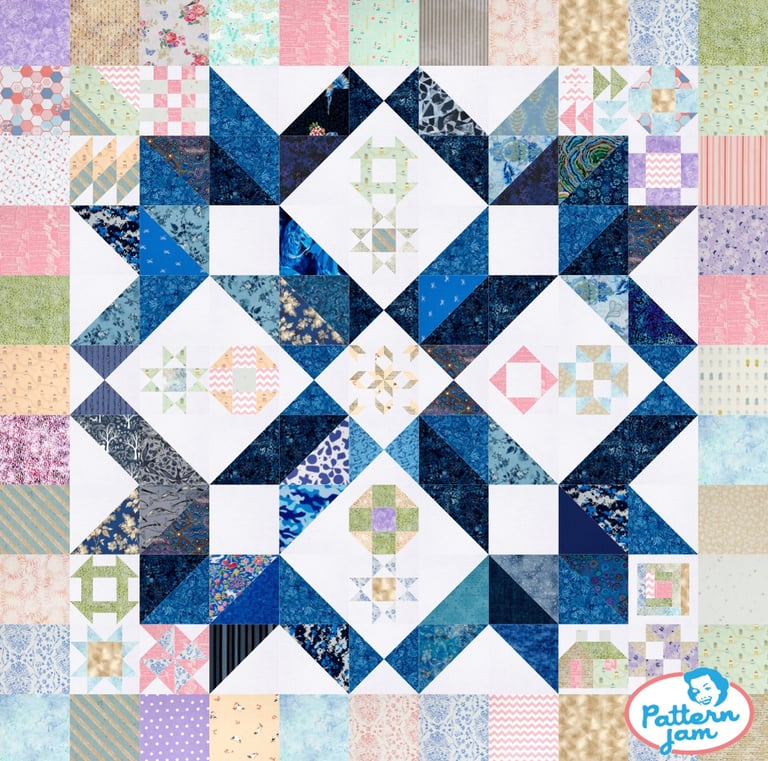
So Far, in my Quilt Design Journey, I’ve used several different types of software to design my quilts.
Pattern Jam
The first computer program I used after moving from Pen and Paper was Pattern Jam. This was several years ago, and the website has went through many changes. I have not used it much in recent years so these are my thoughts on what it used to be. It was nice and simple. Good for beginners. It had pre-loaded blocks that you could drag and drop into your quilt in a nice grid setting. You could change the colors/fabrics to preset fabrics or you could upload your own fabrics. However, you could not create your own blocks. It was free, so I just used it to design my own quilts, not patterns that I was going to sell. Later, they took away the feature where you could upload your own fabrics, as well as the feature to allow you to search fabrics. I did like that you could easily add sashing and borders to the quilt, but it was still a very simple program. The quilt shown here is one I designed for my brother’s wedding. As you can see, it gets the job done. I think it does give you fabric amounts as well, but i’m not sure. This is a free program, and if you’re just starting out, it’s worth a try.
PreQuilt
I next tried PreQuilt. At first it was a bit daunting to learn a new, different technology, but it was pretty intuitive. I learned quickly. I designed my own blocks. I uploaded Fabric. I could pick solids from a wide range of manufacturers. One of the only things I didn’t really like, was that if I wanted to quickly add Sashing between each row, I basically just had to make a new row, resize it to the right size, then fill it in with my chosen color. Pattern Jam would allow you to just add sashings between every (or every-other) block in your size. This was frustrating that I’d lost that feature, but it wasn’t a bad price to pay for more customizations. There’s a bunch of pre-made blocks, but you could edit those to suit your needs. There’s the ability to create your own blocks. You can add borders. It gives you fabric amounts and it will even tell you how to cut your fabric. As a Designer, I can give my customers a link to the pattern and they can even “Color” it in with their own colors and fabrics. I really liked that feature too.
It liked that it’s web-based, so I could work on it from several different computers and my ipad. I started running into difficulties though. I don’t know if it was after an Ipad update or after a PreQuilt update. They did try to work around these issues. The owners even did a zoom call with me to see exactly what the issues were that I was running into. And they fixed it, sort of. Until another update. I don’t know who’s fault it was. I tried Prequilt on the computer, on a Windows Tablet, on the Ipad, and even on Linux. I tried it in Chrome, Safari, Firefox, and a host of lesser-well-known browsers. Some features would work on some devices, but not others. It was a big hassle. I reached out to customer support again and since they couldn’t replicate the problem, they couldn’t really do anything about it. And I understand that, but in the meantime, when I tried to upload fabric to my quilt design, the entire screen went black and reloaded, losing all my changes. I could continue to use only solid colors, and if I was very patient, I could get fabric into the quilt, but it would take three times longer than it used to. However, the price isn’t bad. Even paying for the highest tier, it’s only $10 a month. That’s less than the price of 2 iced coffees.
Quilt Ink
I’m not going to talk about Quilt Ink very much about Quilt Ink. I haven’t used it as a designer, only as a quilter. I like the coloring features, and that you can save your colored quilts to their site. I like clicking on one of the patterns and seeing all the colors people have come up with. However, since I primarily use ipad, Its a bit hard to color accurately, even if I zoomed in, it still seemed like when I clicked a spot, it’d color the spot next to it, even using my apple pen.
For the Designer side of things, for the same price as PreQuilt’s unlimited plan, I’d only get 10 patterns. Just to give you an idea, I currently have about 65 quilt patterns and hundred of blocks on PreQuilt. Sure, I could pay a bit more to get unlimited, but since I had so many issues just coloring the quilts I never took the plunge to try the design side of things.
Other Inexpensive Options?
I had asked on several facebook groups about inexpensive quilt design software as an alternative, and I’d get answers like “Photoshop” or “Inkscape” “Gimp” “MS Paint” “Excel” “Canva” and “Affinity.” I’m not going to say that it’s impossible to design a quilt on those platforms, but those programs were not designed for quilters. Those will not tell you fabric requirements. It won’t tell you how to cut your fabric, you can’t easily tell it that you want sashings. There are no pre-loaded blocks that you just drop in. You might be able to get a good, high quality image of what your quilt could look like if you know how to size the fabric to the right ratio, but those options were not what I wanted. There are a few others I’ve heard about like Quilt Assistant (For FPP), but I don’t do a lot of FPP.
Electric Quilt 8 (EQ8)
As anyone who’s been in the quilting world for any length of time, EQ8 is the go-to software for most designers. It’s a downloadable program for Mac or PC (not Ipad), and has quite a learning curve(or at least I fear it might!). It’s based on your computer, so you can’t just pull it up on your friends’ computer or at the library. It is also quite costly, however, it’s a one-time fee. Not a monthly subscription like these other options. You pay for it once, and it’s yours forever. Additionally, EQ8 has been around for a while, so maybe I was just waiting for version 9? It looks like they have offered upgrades from the older versions to 8 for a small fee, so they’ll probably do that for a new version too. There are a lot of add-ons and a lot of features. There’s a lot of lessons and online classes to learn it, there’s also a lot of people who use it, who might be able to help if you have questions. I’m about to take the plunge and get it though, so we’ll see what all the fuss is about. Come back for a part 2 of this blog post for my thoughts. I’ll let you know if it’s worth it!
I am hoping that it will tell me if my pattern is good for certain precuts. I’m actually in the process of designing one right now that I hope to use a layer cake on, but i had to do the math manually, and it looks like it’s going to use more than 40 10” squares, so I’ll have to either resize and then have extra blocks, or use a bit more yardage.
Contact
tiffany@tialynndesign.com
© 2012-2026. All rights reserved.